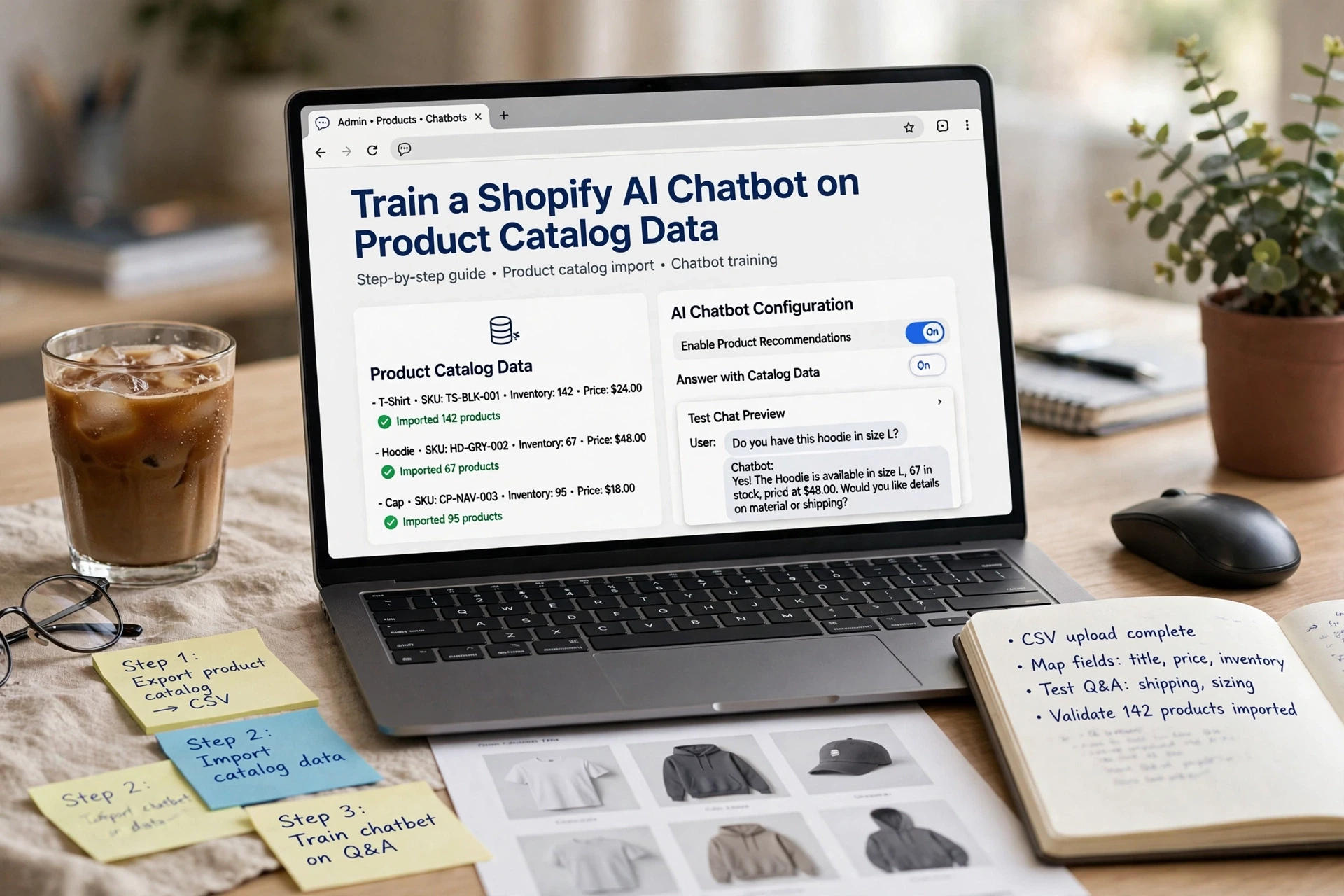
Train a Shopify AI Chatbot on Product Catalog Data
Quick Summary: A Shopify AI chatbot only answers as well as the product data it reads, so a synced feed alone isn't enough. Clean up titles, descriptions, variants, and metafields first, then connect the catalog through the chatbot app and map any custom fields that get misread. Test with 15-20 real shopper questions, fix data gaps at the source rather than patching the bot, and retest after each correction. Kandid and similar tools pull from structured fields, so clean data leads to accurate answers.
A shopper asks if a jacket is waterproof in their size. Your Shopify AI assistant can only answer if those product and variant facts sit in the data it reads. Most stores connect a feed and assume that's enough - it isn't. Here we show how to train AI chatbot answers on real catalog detail, building a product catalog chatbot that validates what it says.
That's why this guide covers getting product data ready in Shopify, syncing it into a chatbot, and testing the answers. We work with these setups daily at Kandid, so the steps below come from real store fixes, not theory.
~67 words target is roughly met here - trimming nothing further.
Step 1: Audit the Product Facts Shoppers Ask About
Before you train AI chatbot tools on anything, fix the source. Your chatbot can only quote what your catalog says, so a missing size chart or vague fabric note becomes a wrong or evasive answer.
Check Titles, Descriptions, Categories, and Variants
Open your Shopify admin and read ten bestsellers the way a shopper would. Ask three questions:
- Does the title say what the product is, not just a fun name?
- Does the description cover material, size, care, use cases, and shipping expectations?
- Are variants (size, color, model) named clearly so the chatbot can tell them apart?
Also check category tags. Wrong categories push the bot toward bad product recommendations.
Add Important Details to Structured Fields
Move scattered facts into structured fields: dimensions, materials, weight, origin, warranty. Bots read structured data more reliably than free text buried in paragraphs. Fill in product metafields for anything shoppers ask about in support chats. Kandid and similar tools pull these fields during syncing, so clean fields mean clean answers.
Also Read: Shopify AI Chatbot vs Rule-Based Bot: Which Should You Choose?
Step 2: Connect the Catalog and Map Custom Data When Needed
Use the Chatbot App's Catalog Connection
To train AI chatbot responses on the right products, connect the app to your Shopify catalog first. Most tools, including Kandid, Tidio, and Rep AI, pull products through the Shopify App Store install rather than a manual feed. Open the chatbot app, find the catalog or sync section, and approve the connection. A first sync usually takes minutes, though large catalogs can run longer. Check that product count matches before moving on.

Map Custom Fields Only When They Are Misread
Syncing pulls titles, prices, and descriptions. Custom data like fabric, care instructions, or sizing charts sometimes arrives unlabeled. Test the bot: ask a question that needs a custom field, such as "Is this jacket waterproof?" If the answer is vague, find the field-mapping setting and link each metafield to a clear name. Most Shopify chatbot apps support this without code.
Map only fields shoppers actually ask about. Every extra field adds noise, and noisy catalogs train AI chatbot answers poorly. Re-sync after edits so the bot reads current data, not last month's version.
Also Read: Shopify AI Chatbot Implementation Guide for Lean Ecommerce Teams
Step 3: Test Product Answers and Close the Data Gaps
A connected catalog does not mean correct answers. Test before shoppers do, and use a checklist like the 25-test chatbot launch checklist as a reference.
Run a Small Set of Real Shopper Questions
Pick 15-20 questions from your live chat logs, support inbox, and product reviews. Mix the types:
- Facts: "Is this shirt machine washable?"
- Stock and price: "Do you have this in medium?"
- Comparison: "How is the 2-pack different from the single?"
- Edge cases: out-of-stock items, discontinued SKUs, bundle questions
Score each answer as right, wrong, or "said nothing useful." A wrong answer is worse than no chatbot at all, so log every miss with the exact question and the product page it failed on.
Correct the Source, Then Retest
Never fix a bad answer inside the chatbot's settings. Find the real gap and fix the data:
| Miss Type | Where to Fix |
|---|---|
| Missing spec | Product description or metafields |
| Old price or stock | Re-sync the catalog |
| Vague reply | Richer FAQ content on the page |
Retest the same questions after each fix. Then spot-check a fresh batch, because new products can reintroduce gaps. A tool like Kandid makes retraining part of the sync, so corrections flow from your catalog rather than from manual patching.

Your product data is ready - now let it sell. Kandid turns your Shopify catalog into answers, product discovery, and recommendations shoppers actually buy from.
FAQ
Q1: How do I train a Shopify AI chatbot on my product catalog? Connect your Shopify catalog sync, review the mapped fields, then test answers against real product questions before going live.
Q2: What data sources can I use to train a Shopify AI chatbot? Product titles, descriptions, variants, policies, FAQs, and past support chats all improve answer accuracy.
Q3: Can a Shopify AI chatbot answer questions about my products automatically? Yes, once synced, it answers product questions instantly and hands off complex cases to a human.
Conclusion
A synced feed is not a trained bot. Clean your product titles, variants, and specs, sync to Shopify Catalog, then test real shopper questions before launch. Structured product data helps your store show up in AI answers like ChatGPT.