Ecommerce Chatbot Product Comparison Workflows for Shopify Stores
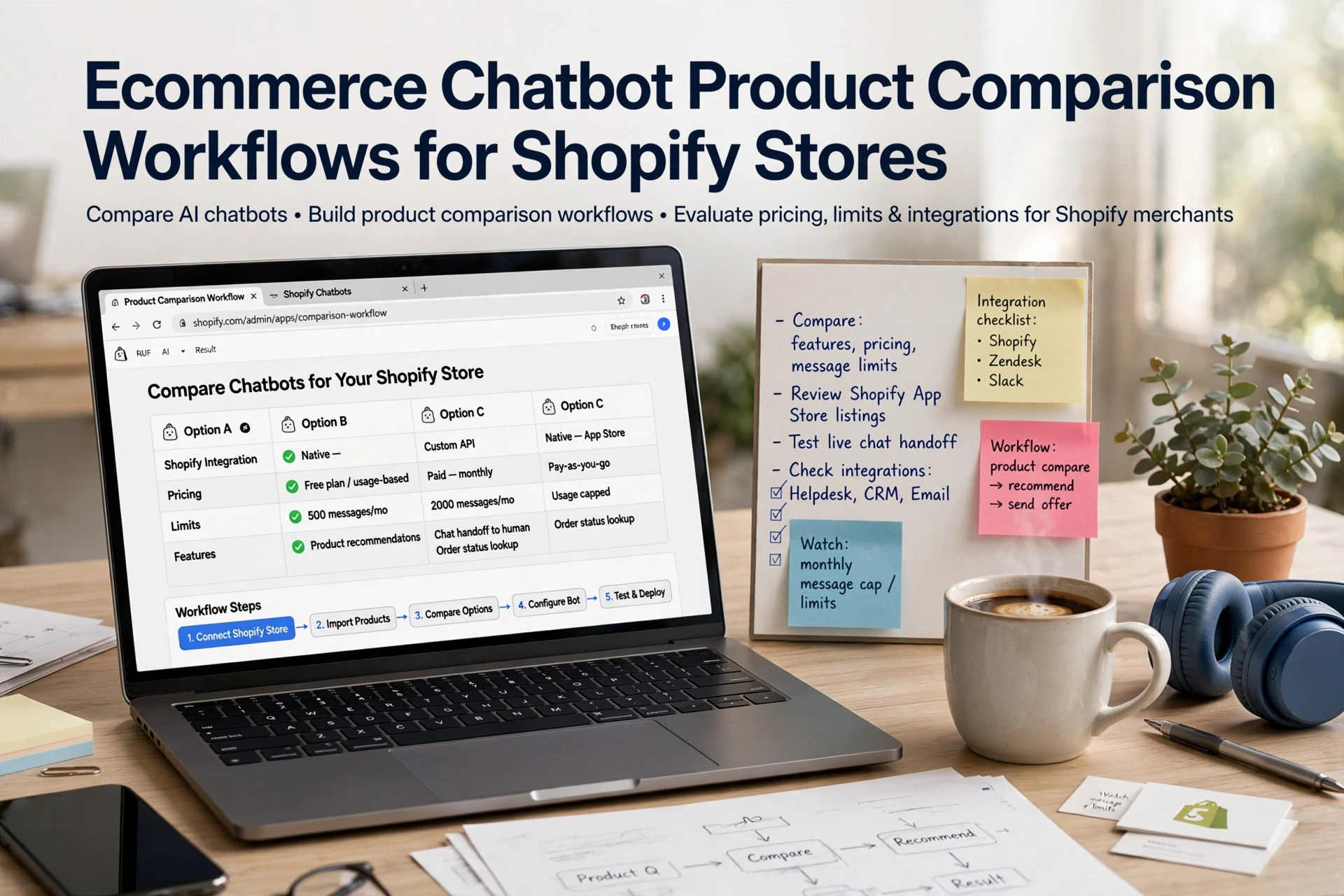
Quick Summary: A reliable ecommerce chatbot product comparison workflow for Shopify needs clean, current product data, a clarifying question to narrow choices to a shortlist of three, and transparent trade-offs rather than a single push. The guide walks through four steps: defining the comparison criteria, syncing live inventory and specs, presenting a recommended item alongside a fair alternative with its downside, and tracking attributed revenue while reviewing drop-off transcripts weekly. Missing data should trigger a human handoff, and the article cites Kandid as a tool that can run this from live Shopify catalog data.
A shopper asks, "Which of these two running jackets is better for wet commutes?" Most bots freeze. Good ecommerce chatbot product comparison needs fresh product data and a fair basis for judging. This guide shows a working ecommerce chatbot product comparison workflow: structured Shopify data, clear questions, honest trade-offs, and human handoff. Build one reliable ecommerce chatbot product comparison flow and conversions follow.
Step 1: Define the Comparison Decision Before the Chat Starts
A shopper who asks "which one is better?" has already decided to buy. Your job is to figure out what they're actually comparing. Research on product comparison shows shoppers look for the few attributes that separate one option from another, not every spec on the page (Amazon Science).
Turn the Shopper's Question Into Comparison Criteria
Translate vague questions into concrete criteria. "Which sofa is better?" usually means price, fabric durability, delivery time, or fit. Your chatbot should ask one clarifying question, then rank products on two or three attributes that matter. When AI presents options side by side, price and ratings drive most decisions, not brand names (eMarketer).

Choose a Shortlist, Not the Entire Catalog
Comparing twelve products stalls the decision. Cap recommendations at three options, each with a clear trade-off: cheapest, best-rated, fastest to ship. Shoppers comparing a $500+ purchase often check three or more sources, so a tight shortlist with honest differences keeps them on your site instead of sending them hunting.
Also Read: Ecommerce Chatbot Product Recommendations and Add-to-Cart Setup Guide
Step 2: Ground Every Comparison in Current Shopify Product Data
A chatbot can only compare what it can see. If your catalog is stale or thin, the bot hedges, guesses, or quotes old prices. Structured product data is what lets AI answer accurately in the first place, per Shopify's own guidance.
Create a Comparison-Ready Product Record
- Fill in title, price, availability, and variants (size, color) for every product.
- Add specs buyers compare: material, dimensions, weight, care instructions.
- Sync live inventory, not a saved snapshot. Most apps re-sync every 15 to 30 minutes, or via webhooks for busy stores.
- Write descriptions in plain sentences: what it is, who it's for, when to use it.

Show Evidence and State Unknowns
A good bot cites its source: "This is from the product page" or "Per our return policy." Shopify Catalog works the same way, giving agents one trusted record instead of scraped guesses. When data is missing, the bot should say so and offer a human handoff, not invent an answer.
Also Read: Ecommerce Chatbot Setup Guide for Shopify Catalog and Storefront Sales
Step 3: Present the Recommendation as a Transparent Trade-Off
Don't push one product. Show the shopper why it fits and what it gives up. Research on recommendation agents finds transparency builds trust as much as recommendation quality does, so explain the "why" behind every pick.
Use a Two- or Three-Product Comparison Format
Pick your strongest match, then one alternative. Keep it simple:
| Product | Best For | Trade-Off |
|---|---|---|
| Recommended item | The shopper's main need | Higher price or longer ship time |
| Alternative | Budget or secondary use | Fewer features |
One media idea for this step:
Offer Fair Alternatives and Confirm the Next Action
Never hide the cheaper option. State it plainly, then ask a closing question: "Want me to add the recommended one to your cart?" A chatbot like Kandid can do this from live Shopify catalog data. No match? Offer human handoff.
Also Read: AI Sales Agent Shopify Catalog Product Question Guide for Merchants
Step 4: Measure Comparison Conversations and Improve the Workflow
Track the Funnel From Question to Purchase
Count comparison chats, product views, add-to-cart, and orders as separate steps. A busy chat log means nothing on its own. Attribution helps: when your bot shares a tracked product link, a later Shopify order counts as an attributed sale. Treat attributed revenue as assisted, not guaranteed lift.
Review Failure Cases Weekly
Read ten transcripts where a shopper dropped off after a comparison. Look for missing specs, wrong recommendations, or stock gaps. Missing product info is a top drop-off driver in chatbot analytics research. Fix those pages, then re-check next week.

Ready to put a comparison workflow into practice? Kandid answers shopper questions and recommends products using your own store data. See how it fits your Shopify store at Kandid.
Frequently Asked Questions
Q1: How can ecommerce chatbots help shoppers compare products on Shopify?
They pull structured product data - specs, price, reviews - and answer "compare X vs Y" questions in chat, then link alternatives and hand off to a human for bigger decisions.
Q2: Do I need to clean up my Shopify product data first?
Yes. Titles, tags, metafields and variants should be accurate and complete, or the chatbot will give vague or wrong comparisons.
Q3: When should the chatbot hand a comparison to a human?
For bulk orders, custom requests or high-ticket items. Set a fallback trigger so shoppers reach your team before they abandon.
Q4: How do I know if comparison chats drive revenue?
Track chat-to-checkout attribution in Shopify analytics and your chatbot dashboard, using a fixed period and clear metrics before claiming results.
Conclusion
A comparison chatbot works when it rests on clean Shopify product data, asks the right clarifying questions, presents fair alternatives, and hands off to humans gracefully. Track revenue attribution to see what actually drives sales, then refine your workflow as you learn.