Shopify Chatbot Analytics: What to Track and Why
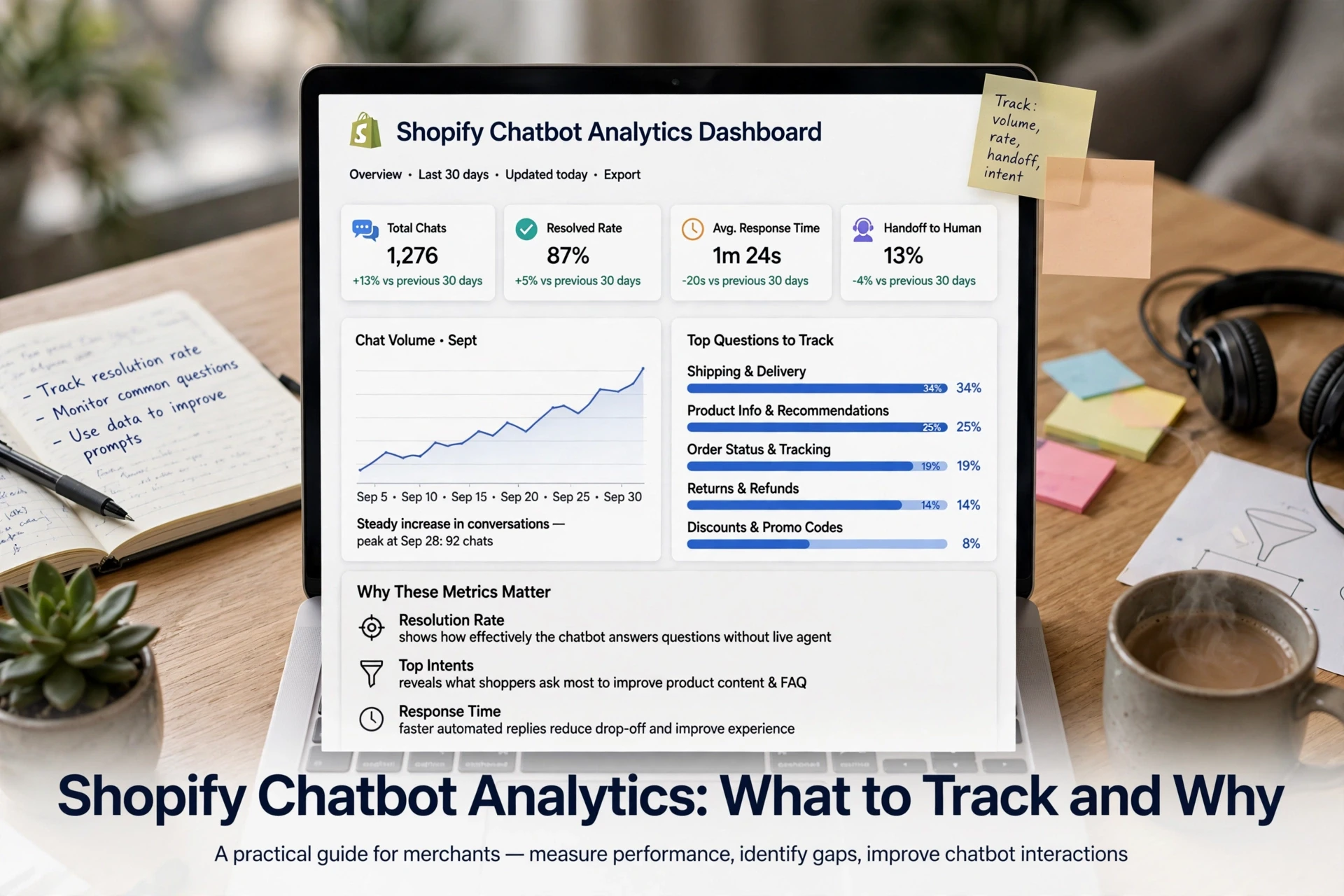
Quick Summary: Track seven Shopify chatbot metrics weekly: engagement rate, chat conversion rate, attributed revenue, resolution rate, handoff rate, unresolved rate, and post-chat satisfaction. Fix engagement first if fewer than 10% of chat sessions send a message, then review 20 transcripts and change one thing each week based on the metric that moved. Do not treat attributed revenue as incremental sales, because some shoppers would have bought without chatting; run a month-long holdout test to measure the chatbot's real lift.
Most Shopify merchants open their chat dashboard after launch, glance at a conversation count, and close it. Nobody ever told them what a good number looks like. Shopify chatbot analytics fix that: this guide pairs each metric with its source, a decision rule and its failure mode, so you can act weekly. It draws on Kandid's work running AI sales assistants for Shopify and D2C stores across the US, India and the UK.
Reach and Engagement: Is the Bot Being Used?
Before you judge revenue, confirm shoppers actually open the chat. Reach and engagement metrics answer that first question in your Shopify chatbot analytics.
Chat Sessions and Engaged Sessions
A chat session counts every shopper who sees the widget. An engaged session counts those who send at least one message. Divide engaged by total sessions to get your engaged session rate. If that rate sits under 10%, most shoppers never type a word, so fix placement, greeting copy or trigger timing before touching anything else. Low engagement makes every downstream metric meaningless.
Where These Numbers Come From in Shopify
Where do I find Shopify chat data for my store? Pull it from three places:
- Your chatbot dashboard (Kandid, Tidio, Gorgias) for sessions and messages
- The Shopify Analytics sessions and conversion report for store-wide context
- Your app's event log or GA4, if it pushes chat events
Match chat sessions to Shopify sessions so numbers line up.
Resolution and Handoff: Is the Bot Actually Helping?
The chatbot conversation deflection rate tells you how often the bot closes a chat without a human. Pair it with the unresolved conversation rate and the chatbot handoff rate metric, and you can tell whether the bot is helping shoppers or quietly losing them.
| Metric | What it tells you | Decision rule |
|---|---|---|
| Deflection rate | Share of chats resolved by the bot alone | High is good only if satisfaction holds |
| Unresolved rate | Shoppers who gave up without an answer | Above 15%? Fix the answers behind it |
| Handoff rate | Chats passed to your team | Not failure; watch response time after handoff |
If unresolved chats cluster on the same questions, that is a content or catalog data problem. Diagnose it with a bullet check: missing product specs, wrong stock answers, no shipping or returns page indexed, outdated policies. Feed the bot the right source material and retest.
Satisfaction and Conversation Review
Add a post-chat satisfaction rating, one thumbs up or down after resolution. Then read 20 random transcripts a week yourself. Ratings miss frustration, so transcripts catch what scores hide. Every rating, attribution aside, is a leading signal: unhappy shoppers rarely buy, so falling satisfaction shows up in revenue a few weeks later.
Revenue Metrics: Separating Attributed Revenue From Real Lift
Chat-Assisted Conversion Rate and Attributed Revenue
Attributed revenue is the total value of orders from shoppers who chatted. Shopify chat conversion rate tracking pairs chat sessions with purchases using cart tokens or session matching, and Shopify inbox analytics shows orders assisted per agent. If your numbers depend on this pairing, work through a Shopify AI chatbot conversion tracking guide so the setup is sound before you celebrate.

Estimating Incremental Lift Honestly
Attributed revenue is not incremental lift. Some chatters would have bought anyway. The difference matters: attributed revenue counts every order after a chat, while lift counts only orders the chat caused.
| Metric | What it counts |
|---|---|
| Attributed revenue | All orders after a chat session |
| Incremental lift | Extra orders caused by the chat |
| How to measure lift | A holdout test: hide the chatbot from a random shopper group, then compare |
Run the holdout for at least a full month before drawing conclusions.
Turning Metrics Into a Weekly Operating Routine
The Seven Metrics to Keep on One Screen
What are the key Shopify chatbot analytics metrics to monitor? Track these seven:
- Engagement rate: share of sessions where shoppers actually start a chat.
- Shopify chat conversion rate: orders from chat sessions, read in your Shopify Analytics sessions and conversion report.
- Attributed revenue: chat-assisted sales, checked against incremental lift from a holdout test.
- Resolution rate: conversations closed without human help.
- Handoff rate: how often a bot passes shoppers to your team.
- Unresolved conversation rate: shoppers who quit without an answer.
- Post-chat satisfaction rating.
A Weekly Review That Changes Something
Each Monday, scan the screen for one number that moved. Read 20 transcripts behind it, then change one thing: a greeting, an answer or a trigger. Track it in a chatbot revenue dashboard so next week's number tells you if the fix worked.

Once your chat metrics are flowing, see how they move. Kandid gives your Shopify store an AI sales assistant built to turn chats into orders.
Frequently Asked Questions
Q1: What are the key Shopify chatbot analytics metrics to monitor?
Engagement rate, chat conversion rate, attributed revenue, resolution rate, handoff rate, unresolved conversation rate, and post-chat satisfaction.
Q2: How do I measure incremental lift, not just attributed revenue?
Run a holdout test: hide the bot from a random shopper group for a full month, then compare order rates.
Q3: How often should I review chatbot analytics?
Weekly. Scan for one moved metric, read transcripts behind it, and change one thing.
Conclusion
Track seven numbers, read transcripts weekly, and change one thing at a time. Remember that attributed revenue flatters; the holdout test tells the truth. Shopify chatbot analytics work only when each metric triggers a decision.